


Your kid is on Instagram. You've seen the app on their phone, and you've probably wondered what they run into once they open it. So is Instagram safe for them, or has it gotten worse while the safety marketing got louder? The honest answer, backed by researchers who tested Meta's own tools, is not what the company wants you to hear. If your child's account is private or you've been shut out, an Instagram private account viewer can show you what's really going on.
Is Instagram Safe, or Is It Getting Worse?
Instagram is one of the largest social networks on earth, and a huge share of its users are teenagers and preteens. Meta knows this. It built mandatory teen accounts in September 2024 precisely because regulators and parents were demanding it.
So the platform is safer now, right? The reality is messier. Parents in community forums describe a strange double standard: toxic content stays up while ordinary accounts get flagged and banned. The frustration is consistent, and it points to a system that doesn't police what it claims to.
Here's the thing worth sitting with. A bigger platform with more safety features isn't automatically a safer one. What matters is whether those features work. And that's what independent researchers set out to test.
Is Instagram Dangerous for Kids? What the Research Actually Shows
In 2025, a review led by Arturo Béjar, a former senior Meta engineer who testified against the company before US Congress, tested Instagram's teen safety tools alongside academics from New York University and Northeastern University, plus the UK's Molly Rose Foundation. The finding was blunt. Two-thirds, or 64%, of the new safety tools were ineffective, as the Guardian reported. Meta rejects the findings.
Béjar didn't hedge. He said Meta "consistently makes promises" about protecting children from harmful content and inappropriate contact, but the tools themselves are "ineffective, unmaintained, quietly changed, or removed." The safety features exist mostly as reassurance, not protection.
The specifics are what should concern any parent. The review found that adults could still reach teens through messaging despite restrictions that supposedly blocked it. The "Hidden Words" filter, built to screen offensive comments, lets harmful content through. And the recommendation system surfaced search terms tied to self-harm and eating disorders, served to the exact age group the tools were meant to shield.
So is Instagram dangerous for kids? On its own, with default settings and the safety tools Meta advertises, the research says those protections can't be trusted to do their job.
Is Instagram Safe for 12 Year Olds
Instagram's official minimum age is 13. In practice, younger kids get on constantly, a birth year is the only gate, and it takes 10 seconds to fake. So what does a 12-year-old walk into? This is where the question of whether Instagram is safe for 12 year olds gets its clearest answer.
The same environment adults get, minus the judgment to handle it. An algorithm that pushes sexualized content into feeds without being asked. Comment sections open to strangers. Follow requests from accounts a child has no reason to trust and no framework to evaluate. None of this requires the child to go looking. It arrives on its own.
For a 12-year-old, the gap between "old enough to make an account" and "old enough to navigate what's on it" is enormous. The platform doesn't account for that gap. It treats a 12-year-old who lied about their age the same as an adult, which is to say, it mostly doesn't protect them at all.
Does Instagram Safe for Kids Come Down to Built-in Tools Alone?
Meta's answer to all this is its own toolkit: teen accounts, restricted comments, parental supervision. These aren't worthless. But independent testing confirmed they have real limits, and parents lean on them expecting far more than they deliver.
Those tools don't tell you who's following your child. They don't show you what comments are being left on their posts, or who's interacting with them. Meta's parental alerts tend to notify you after something has already gone wrong, not before. That's a smoke detector that beeps once the room is full.
Béjar put the stakes in plain language: "Kids, including many under 13, are not safe on Instagram. This is not about bad content on the internet, it's about careless product design." When the person who led the safety review says that, relying on built-in tools alone stops being a reasonable plan.
Instagram Safety for Parents: What You Can Actually Do
If the platform won't give you real visibility, you need it from somewhere else. That's the practical core of Instagram safety for parents, seeing what's happening on your child's account, not what Meta's dashboard chooses to surface.
Peekviewer was built for this. With your child's username, you can monitor their Instagram without an account of your own and without installing anything. It works on any accounts, and the monitored account isn't notified. For a parent who's been blocked or whose teen keeps a locked profile, that's the difference between guessing and knowing.
What Peekviewer Shows Parents
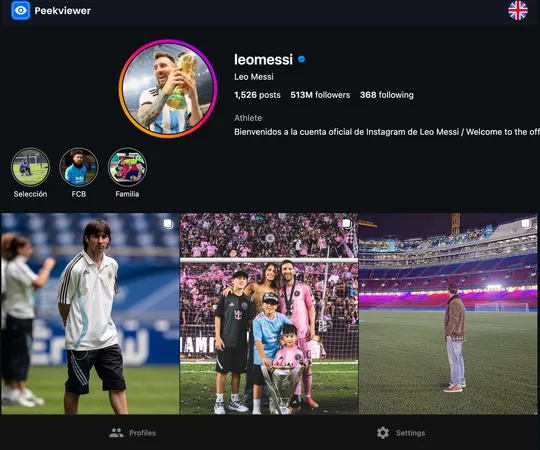
The tool focuses on the activity that tells you something. Rather than a flat data dump, it surfaces the changes worth noticing:
- See private Instagram account followers
- Hot Likes — new likes appearing on older posts
- Tagged photos, including content your child didn't post themselves
- A 3-month activity history, so patterns are visible over time, not just today
- Access to private accounts with just a username
- Fully anonymous monitoring, no notification reaches the account
That last point matters for a reason beyond discretion. The ability to see a private Instagram account is one of Peekviewer's real advantages — the profile opens up without a follow request, no approval needed.
How to Use Peekviewer
Getting started takes a couple of minutes from any browser:
- Go to peekviewer.com
- Enter your child's Instagram username
- Choose a plan based on the account type
- Start monitoring from your dashboard
Blocked you? Here's how to see a blocked Instagram account anyway. It doesn't care about the block — you just need the username, and you're back in. You can also use Peekviewer as an Instagram following viewer and Instagram comment viewer.
Get Real Visibility Into Your Child's Instagram
If your child's account is private or you've been blocked, Peekviewer gives you real visibility anonymously, and without turning it into a confrontation.
Start monitoring with Peekviewer
Conclusion
Is Instagram safe for kids? Based on the researchers who tested it, the built-in tools can't carry that promise on their own — two-thirds of them failed. Parents who want to stay ahead of problems need visibility beyond what Meta offers, and Peekviewer gives you that without alarms or confrontation. Knowing what's happening in your child's online life is the first real step toward keeping them safe.
FAQ
Officially, under-13s aren't allowed on Instagram at all, as 13 is the minimum age. In practice, many get on by entering a false birth year, and even with teen accounts active, children including many under 13 are not adequately protected.
Instagram's built-in supervision tools show limited information and often alert you only after a problem occurs. To see followers, tagged photos, and activity changes as they happen, parents typically need a monitoring tool like Peekviewer, which works with just a username.
A method that doesn't require your teen's password or logging into their account is both safer and more respectful of the account's security. Peekviewer monitors from your own dashboard using only the username, so no credentials change hands.
Yes. Peekviewer tracks new followers and following changes anonymously, and the monitored account receives no notification that anyone is viewing it.