



You have a first name, maybe a face from a party photo, possibly a number saved under the wrong contact. What you don't have is the handle, and Instagram's search bar assumes the handle is the one thing you already know. That gap is the whole problem, and it's why how to find someone on Instagram ranks among the platform's most stubborn recurring searches. Working out how to find someone on Instagram without their username takes a method, and we are happy to share it with you.
Most "tricks" ranking for this query fall apart the moment you try them on a real account. We worked through them the tedious way. What follows is what is held up, sorted from the obvious to the genuinely useful, and if your goal is to find the profile and then look at it later without turning up in their views, there's a cleaner route waiting at the end. You can also see others' activity on Instagram once you have the right account in front of you.
How to Find Someone on Instagram by Name
Start with the search bar, because sometimes the boring answer is the right one. The classic route to how to find someone on Instagram is the name field: open Instagram, tap search, type the full name. It works cleanly when the name is uncommon, two or three "Priyanka Deshmukh" results are easy to sort by mutual followers and profile photo.
Common names are where it collapses. Search "James Miller" and you'll scroll past a few hundred accounts before you give up. Two moves narrow it fast. Read the mutual-follower count on each result, since a shared follower beats a matching name every time. Then check the accounts Instagram suggests after you follow one plausible match. If your own profile is thin on connections, a throwaway account with a few realistic follows widens what Instagram surfaces; the same logic behind a convincing fake Instagram account, minus the deception.
Can I Find Someone on Instagram by Phone Number?
Short answer: sometimes, and only sideways. Can I find someone on Instagram by phone number is the question, and Instagram's honest reply is that it runs no direct phone lookup. What it runs is contact syncing.
Save the person's number to your phone, then open Instagram and go to Settings → Follow and Invite Friends → Connect Contacts. If they registered with that number and left syncing enabled, their account can appear in your suggestions. The caveat outweighs the method. This fires only when they opted in, and a growing share of users switch it off. So you might find someone on Instagram by phone number, treat it as a coin flip, not a guarantee. If the sync draws a blank, try the number on WhatsApp or Telegram first; a linked profile photo there often confirms you have the right person before you keep digging.
How to Find Someone on Instagram by Photo
If a name gets you nowhere, a picture sometimes does. This route relies on reverse image search: drop the photo into Google Images or TinEye and see where else it surfaces online. When someone reuses the same headshot across LinkedIn, a dating profile, or a public Instagram, the reverse search can stitch those together.
Our own testing tempered the optimism. We ran a batch of profile photos through both engines. Recognizable public figures matched almost every time; ordinary private users matched rarely; cropped or heavily filtered photos matched almost never. The two engines rarely agreed, either: a face TinEye missed, Google Images sometimes caught, so running both is worth the extra minute. The method is real, but it rewards people who already carry a public footprint. For a stranger who guards their images, expect thin results and don't build the search around it.
How to Find Someone's Instagram From Facebook, Snapchat, or TikTok
People rarely live on one platform, and the leftovers on the others do real work. For how to find someones Instagram from their Facebook, link the accounts you can and open Instagram's Discover People section, which pulls from Facebook friend connections. Mutual Facebook friends often expose the handle directly.
Snapchat and TikTok take a lighter touch. There's no clean integration, so how to find someones Instagram from their Snapchat usually means reading their Snap profile or story for a posted handle, or searching their display name on Instagram: people reuse the same name across apps more often than not. TikTok bios list the Instagram handle outright surprisingly often, which makes it the quickest of the three when it lands. One shortcut most guides skip: Threads runs on the same handle as its Instagram account, so finding the person on Threads hands you the exact username directly.
How to Find Someone on Instagram by Email
Email is the weakest of the direct routes. Instagram retired friend-finding by email years ago, so no in-app field waits for an address.
Two workarounds survive. Save the email as a phone contact, and the contact-sync path from earlier can occasionally surface the account. Better yet, take the part of the address before the @ and type it into search on its own. Plenty of people use their email handle as their username, so "jordan.reyes88" as an email often means "jordan.reyes88" as an account.
How to Find Someone on Instagram Without Their Username — Advanced Methods
When the front doors are locked, the side entrances open. At this stage, finding the account without a handle is less one clever trick and more triangulation.
A few reliably pay off. Open the following lists of any mutual friends and scroll for the face you recognize. Check the tagged-photo and location tabs of a place they were, since group shots surface people who never appear in search. Run a Google query using the operator site:Instagram.com plus a name and city, which pulls indexed public profiles the app buries. Reddit threads on this exact problem are worth a skim for what people say about it, the crowd-sourced answers lean on mutual-follower digging and Google operators, which matches what held up for us.
Instagram User Search Without Account: How to Look Up Instagram Accounts Without Logging In
Now the question underneath the question. Instagram user search without account is possible, with an asterisk. Any public profile is reachable by direct URL, and Google indexes a large share of them. So how to search people on Instagram from outside the app often means searching "[name] Instagram" on Google and clicking through.
That covers the basics of Instagram search friends without login, and it doubles as a passable Instagram people finder when you only need to confirm an account exists. What it can't do is run in-app search or contact sync, and it stops dead at private profiles. You can look up Instagram accounts this way, and Google's index makes a serviceable Instagram people finder for public pages, but the second the account turns private, or the second you want more than a profile photo, the free route runs out. There's a cleaner way to reach those profiles and read them properly, with no Instagram login at all.
How to Find Someone on Instagram Without Them Knowing
Finding the profile is one problem. Opening it is another. The instant you land on certain account types, or fumble a follow request, your name attaches to the visit, so viewing them without a trace is really about solving that last step, not the search.
This is where Peekviewer earns its place. It's a web-based viewer. Once you have the username from any method above, you enter it and read the full profile from your browser, on any device, with no Instagram account and without showing up in their views. It works on private profiles as well as public ones, which is the exact point where the free tricks quit. And because it holds what you view for up to three months, you can revisit a profile's activity later instead of racing an expiring story.
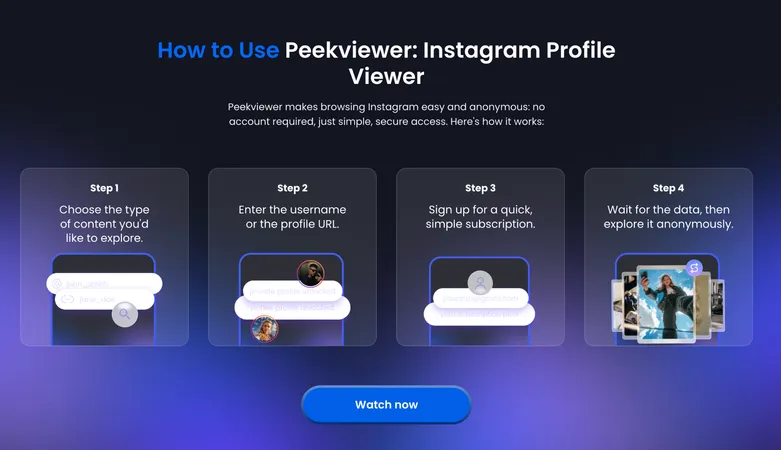
What You Can View After You Find the Profile
Peekviewer keeps the found profile open to you across the things the app hides once you'd otherwise need to follow. In practice, that means a short, relevant set:
- Full profile, bio, posts, and reels on public and private accounts
- Stories and highlights, with no viewed-by trace left behind
- The Instagram followers viewer — followers and following, even on private pages
- A three-month activity history saved to your dashboard, so nothing expires out of reach
That list is deliberately short. Peekviewer does more, but for the specific job of finding someone and then reading their profile without a footprint, those are the parts that matter.
The Answer to Finding Someone on Instagram
The honest answer to how to find someone on Instagram is that no single method wins. You match the route to what you already hold: a name, a photo, a number, or a mutual friend. Reverse image search rewards public footprints, contact sync depends entirely on their settings, and knowing how to search people on Instagram from outside the app does more than the in-app bar. Once the right profile is in front of you, the finding is over and the looking begins. That last step is the one worth doing without a trace. For that, Peekviewer is the tool.
FAQ
Yes, though how well depends on the name. Uncommon names are sorted quickly by mutual followers and profile photos. Common ones need help, lean on shared followers and the accounts Instagram suggests after you follow one likely match.
No. Instagram offers no direct phone-number search. Contact syncing is the only native path, and it works only when the person registered that number and kept syncing switched on.
Partly. Public profiles open by direct URL, and Google indexes many of them, so a "[name] Instagram" search often surfaces the right page. In-app search, contact sync, and private profiles stay out of reach without a login, which is where a browser-based viewer like Peekviewer takes over.
Once you have the username, enter it in Peekviewer and read the profile from your browser with no Instagram account and without appearing in their views. It covers private profiles as well as public ones.