


You screenshot someone's Instagram highlight — now you're paranoid. Does Instagram show if you screenshot a highlight? No, it doesn't. We checked, tested, and confirmed: no notification is sent, ever. But let's break down exactly why — and what Instagram does track. And if you want to stay completely invisible while browsing profiles, Peekviewer's Instagram story viewer is what thousands of users trust for exactly that.
Why Users Take an Instagram Highlight Screenshot
500 million people use Instagram stories daily — and highlights are just saved stories. That's a massive amount of content worth keeping. People take an Instagram highlight screenshot for all kinds of completely normal reasons:
- Saving useful info — promo codes, addresses, contact details
- Keeping personal memories from friends' or family profiles
- Sharing content with people who aren't on Instagram
- Holding onto tutorials, tips, or product recommendations for later
- Collecting visual inspiration for projects or mood boards
- Catching something worth sharing with friends — yes, gossip counts too
All completely ordinary — which is exactly why so many people wonder whether the other person finds out.
Does Instagram Notify When You Screenshot a Highlight?
Once a story gets saved as a highlight, Instagram treats it like a regular post. Regular posts have never triggered Instagram story highlight screenshot notification — and highlights follow the exact same rule. The account owner sees nothing. It doesn't matter if the profile is public or private. You can even view someone's Instagram story and block them right after — and they still won't know you were ever there.
If I Screenshot a Highlight Will They Know?
Instagram will not notify anyone when you take an Instagram highlight screenshot — and it goes beyond just notifications. Highlight owners have no access to that information whatsoever. Sprout Social reports that 71.9% of all brand content lives in stories and highlights — yet Instagram tracks zero screenshot activity across any of it. Here's how different content types actually behave:
- Stories — no screenshot notification since Instagram scrapped the feature in 2018
- Highlights — once saved, treated exactly like regular posts; no tracking of any kind
- Disappearing DMs — the only real exception; screenshots here do trigger a notification
Can People See If You Screenshot a Highlight?
Instagram gives creators no tools to find out who screenshots their content. There is no Instagram story highlight screenshot notification — and unlike stories, which show a viewer list while still active, highlights lose that visibility the moment they're saved. No screenshot counter, activity flag, or third-party workaround that reliably changes this.
So can people see if you screenshot a highlight? Not a chance. Instagram simply doesn't record that data — and that's actually one of the platform's clearest privacy limitations. It protects viewers, not creators. Which is also why so many people look for ways to view private Instagram for free — because the platform itself gives profile owners very little visibility into who's watching, let alone who's screenshotting.
| Content Type | Notification? | Safe to Screenshot? |
| Feed Posts & Reels | ❌ Never | ✅ Always |
| Stories & Highlights | ❌ Never | ✅ Always |
| Regular DMs | ❌ Never | ✅ Always |
| Disappearing DMs & Vanish Mode | ⚠️ Yes | ❌ They'll know |
When Instagram Actually Sends Screenshot Notifications
There are exactly 2 situations where screenshotting on Instagram gets noticed — and both happen inside direct messages only.
Disappearing photos and videos. When someone sends a photo or video set to "View Once" or "Allow Replay" via the DM camera, the sender gets an immediate alert the moment you screenshot it.
Vanish Mode. Messages here disappear once the chat is closed. Screenshot anything inside a Vanish Mode conversation — and the other person is notified right away.
That's genuinely it. If you've been wondering, does Instagram notify when you screenshot a highlight — the answer is no, because there is no Instagram story highlight screenshot notification for profile content of any kind. Instagram's Help Center confirms that notifications exist only to protect content that was meant to disappear.
How to Save a Highlight Without Taking a Screenshot
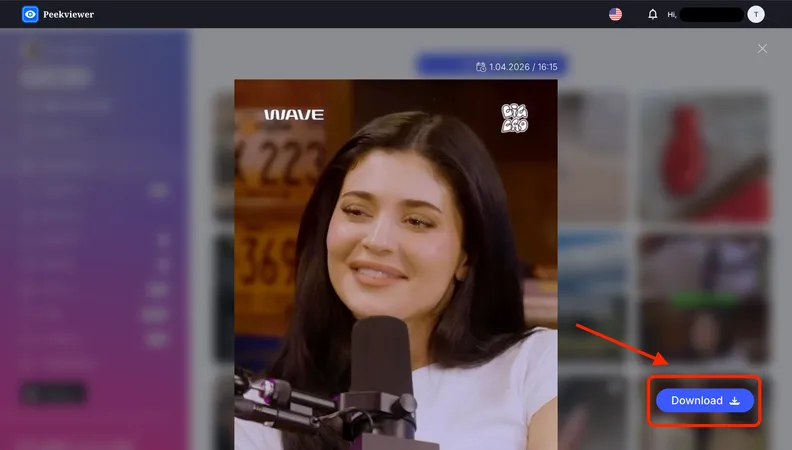
Screenshots do the job, but the quality suffers. And if you've landed here asking does Instagram notify when you screenshot a highlight — you already know there's a better way to save content without the guesswork. A smarter move is using a tool that downloads content directly. Peekviewer was built exactly for this — and honestly, it does a lot more than just save highlights.
Peekviewer is fully web-based, requires zero installation, and works without an Instagram account. You open a browser, enter a username, and you're in. Here's what our users rely on it for most:
- Downloading photos and videos from any profile in full quality
- Viewing private Instagram profiles anonymously — no follow request needed
- Tracking new followers, following changes, and tagged photos over time
- Detecting new likes on older posts — something Instagram itself doesn't surface
- Viewing someone's Instagram story without them ever knowing
- Keeping up to 3 months of collected data, so nothing slips through
We've seen Peekviewer genuinely change how people stay informed — whether that's a parent keeping an eye on their kid's activity, someone who wants to see who someone interacts with most on Instagram, or just a user tired of losing content to a bad screenshot. One screenshot saves a moment. Peekviewer keeps the whole picture.