





Yes, Instagram lets you hide activity on Instagram, but not all of it. Some things switch off in seconds. Others hit a hard wall the platform builds in by design. How to hide activity on Instagram is one of those questions where the answer depends entirely on which type of activity you're asking about.
Instagram now has 3 billion monthly active users globally, and the platform shares more about your behaviour than most people realise by default. This guide walks through every setting worth adjusting, what each one actually changes, and where it stops working. We'll also show how thousands of users view Instagram followers and monitor profiles in a more private way.
How to Turn Off Activity on Instagram
The first thing most people want to fix is the activity status of the "Active now" or "Active X hours ago" label that appears next to your name in DMs. According to Instagram's Help Center, by default, anyone you follow or have exchanged direct messages with can see your activity status. Turning it off removes that visibility entirely.
Here's how to do it:
- Open Instagram and tap your profile icon
- Tap the 3 lines (menu) in the top right corner
- Go to Settings and Activity
- Select Messages and Story Replies
- Tap Show Activity Status
- Toggle it off
That's the simplest way to hide activity on Instagram in DMs. The timestamp disappears immediately, no one sees "Active now" or when you last opened the app. One thing worth knowing upfront: this is mutual. When you turn off activity on Instagram, you also lose the ability to see other people's activity status.
Want to See Any Profile Without Showing Up?
Curious about a profile but don't want them to know you were there? Peekviewer lets you monitor any Instagram profile completely anonymously. Stories, followers, posts, and more! No account or login needed.
How to Hide That You're Active on Instagram
How to hide that you're active on Instagram is a slightly different question, because "active" means different things depending on where someone is looking. Here's exactly what each scenario looks like:
- In DMs. Once activity status is off, your "Active now" label and last-seen timestamp disappear from all direct message conversations, existing and new. One toggle, done.
- In your followers list. Your followers list is public by default, but you can restrict who sees it. Switch your account to private (Settings → Privacy → Account Privacy → Private Account) and only approved followers can view your followers and following lists. If you keep a public account, there's no native way to hide the lists, but you can remove followers individually without notifying them, or block specific accounts from seeing your profile entirely.
- In story views. Watching someone's story while logged in still adds your name to their viewer list, regardless of your activity status setting. These are 2 separate systems on Instagram, and there's no native toggle to opt out of story view tracking.
- In profile visits. Instagram doesn't give account owners any data on who visited their profile. Simply viewing someone's page is invisible by default, as long as you don't like, comment, or follow during the visit.
How to hide that you're active on Instagram in the DM sense is handled by one toggle. For broader invisibility — hiding your follower lists, story views, and anonymous monitoring — you'll need to combine multiple settings, or step outside Instagram's tools entirely. That's what the rest of this guide covers.
How to Make Your Activity Private on Instagram
How to make your activity private on Instagram goes beyond the activity status toggle. Here are the specific settings that give you real control:
- Hide story views. Every time you watch a story while logged in, your username lands in the creator's viewer list. Instagram has no native toggle to prevent this. Your options: use Peekviewer to browse anonymously, or view someone's Instagram story and then block them immediately after, which works, but it's an impractical workaround at any scale.
- Hide like counts. You can hide the like count on your own posts so others can't see how many likes they received. Go to Settings → Privacy → Posts → toggle on Hide Like and View Counts. You can also do this per post when creating or editing it. Keep in mind: this hides the number publicly, but the people who liked the post still show up to you in the likes list.
- Monitor likes anonymously. If you want to track which posts someone's content is getting attention on without making your interest visible, Peekviewer's Instagram likes viewer gives you that data with no account and no trace on the platform.
- Switch to a private account. Settings → Privacy → Account Privacy → toggle on Private Account. Only approved followers can see your posts and stories from that point.
- Use Close Friends for stories. Post stories selectively by assigning them to your Close Friends list, only people you manually add can view them.
Hiding Activity on Instagram in DMs
DMs are where most people feel the most watched, and Instagram has genuinely improved its privacy tools here.
- Read receipts. Instagram now has a native toggle to turn off the "Seen" receipt. To disable it for one conversation: open the chat → tap the person's name at the top → Privacy & Safety → toggle off Read Receipts. To turn it off for all chats: Settings → Messages and Story Replies → Privacy & Safety → toggle off Read Receipts. Like the activity status setting, this works both ways. Once it's off, you also won't see when others have read your messages.
- Vanish Mode. This is Instagram's disappearing messages feature, once the chat is closed, everything in it is gone. One important detail to know: taking a screenshot inside Vanish Mode sends a notification to the other person. Standard DMs don't trigger any screenshot alert.
- Message request filtering. Control exactly who reaches your main inbox. Settings → Messages and Story Replies → Message Controls lets you limit incoming DMs, pushing contacts who don't meet your criteria into a separate requests folder out of sight.
- Restricting accounts. Restricting is quieter than blocking. The restricted account's DMs go to Message Requests, they can't see your activity status, and they're never told they've been restricted.
What You Can't Fully Hide on Instagram
Worth being direct about the platform's limits. How to hide activity on Instagram only goes so far, and knowing where the walls are saves you from a false sense of privacy.
Profile visits are actually one of the safer areas. Instagram doesn't show account owners who viewed their profile, so simply landing on someone's page leaves no trace, as long as you don't like, comment, or follow while you're there.
Story views are the biggest gap. The moment you watch a story while logged in, your username lands in that creator's viewer list. No privacy setting inside Instagram removes this. It's built into how the feature works, and there's no toggle, workaround, or account setting that changes it. The only real solution is viewing through an anonymous tool like Peekviewer that sits outside Instagram's tracking system entirely.
Post visibility is a separate issue that catches people off guard. Turning off activity status and hiding like counts doesn't make your posts invisible to others. If your account is public, your content is public. Activity settings and content visibility are completely different things on Instagram, and adjusting one has zero effect on the other.
Tagged photos sit in their own category too. You can require manual approval before a tag goes live on your profile: Settings → Privacy → Tags → Manually Approve Tags, but you can't stop someone from tagging you in the first place. The tag exists on their post regardless. Approval only controls whether it shows up linked to your profile.
How to hide activity on Instagram completely, especially story views and anonymous follower tracking, is where Instagram's own settings hit a hard wall.
Using Peekviewer to Stay Private
If the goal is to hide activity on Instagram completely — every story view, every follower check, every browse — Peekviewer fills the gap Instagram's settings leave open.
It's a fully web-based private Instagram account viewer. You enter a username and you're monitoring. The profile owner is never notified, not when you view their stories, not when you check their followers, not ever.
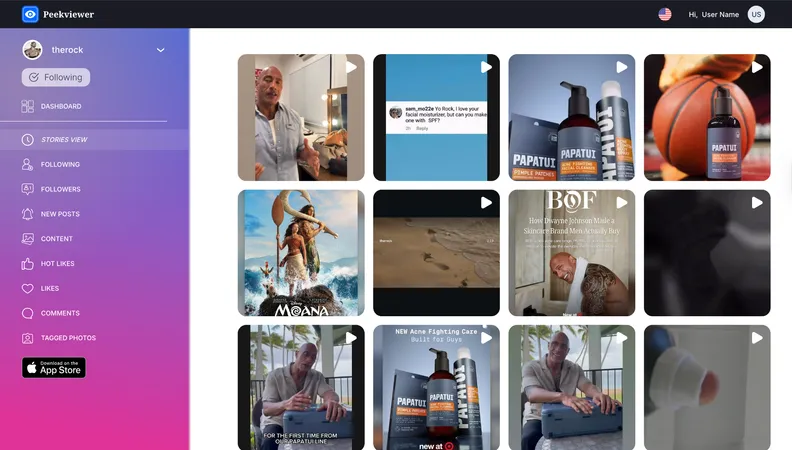
Here's what our users rely on it for most:
- Anonymous profile access: public or private, no follow request needed
- Watch stories without appearing in the viewer list
- Monitor followers and following changes in real time
- Detect Hot Likes — new likes appearing on older posts
- Track tagged photos across any profile
- Download photos and videos in full quality
- Store up to 3 months of activity data
Works on any device, opens in any browser. We built Peekviewer because how to hide activity on Instagram completely isn't something the platform itself ever fully delivers on. Whether you're a parent who wants to know who their kid is actually talking to, someone keeping an eye on a competitor's account, or just a person who'd rather browse without leaving a trail, Peekviewer keeps you invisible while you see everything you need to.
FAQ
Yes, but only partially. You can disable Activity Status to remove your DM presence, turn off read receipts, hide your like counts on posts, restrict your followers list by switching to a private account, and require manual approval for tags. What Instagram doesn't let you hide natively: story views and anonymous private profile browsing. Every story you watch while logged in adds your name to the viewer list. For complete invisibility, Peekviewer takes you outside Instagram's tracking system entirely.
Go to Settings → Messages and Story Replies → Show Activity Status → toggle off. This removes the "Active now" label and last-seen timestamp from all your DM conversations immediately. No one gets notified when you change it, and you can switch it back on anytime. Keep in mind this only affects your DM presence, it doesn't touch story views, post visibility, or your followers list.
No, these are 2 completely separate systems. Turning off your activity status only removes your timestamp from DMs. Your name still appears in a story's viewer list every time you watch one while logged in. There's no Instagram setting that changes this. The only way to view stories without showing up is through an anonymous tool like Peekviewer.
Yes, unless you turn off read receipts. Instagram has a native toggle for this: open the chat → tap the person's name → Privacy & Safety → toggle off Read Receipts. You can also disable it for all conversations at once via Settings → Messages and Story Replies → Privacy & Safety. Like the activity status setting, it works both ways, you also stop seeing when others read your messages.
Yes, it's mutual. When you turn off activity on Instagram, you also lose the ability to see other people's activity statuses. Instagram applies this equally, you can't hide yours while continuing to see theirs. The same logic applies to read receipts: turning them off means you won't see other people's "Seen" confirmations either.