



One day the profile was there. The next, gone. No warning, no note, no goodbye post, just a username that now returns nothing. If you're hunting for a deleted Instagram account viewer, you already know the strange, low-grade vertigo of watching a person disappear from a place where they used to live every day. You can see the Instagram profile viewer results for everyone else. Just not the one you wanted. This is an honest guide to what's recoverable, what isn't, and where the real options end.
Why People Look for a Deleted Instagram Account Viewer
We don't search for this out of nowhere. There's always a reason, and after watching the patterns, I'd say the reasons fall into a few recognizable shapes.
An ex deletes everything in the 48 hours after a breakup: the account, the photos, the shared history, all of it pulled offline in one decisive sweep. A relative who was posting daily simply stops, and the profile goes dark, and the family group chat fills with questions nobody can answer. Sometimes it's a business contact you needed and now can't reach. And sometimes the account isn't deleted at all, you've been blocked, and the two states look identical from where you're standing.
That last distinction matters more than people expect. A blocked account still exists; a deleted one doesn't. Knowing which you're dealing with changes everything about what comes next.
What Instagram's Policy Says About Deleted Accounts
When someone deletes their Instagram account, the content does not sit in some retrievable limbo. Instagram holds the account in a deactivated state for a short window — long enough for the person to change their mind — and then removes it.
After that grace period, the data is gone from Meta's servers. Permanently. There's no archive you can petition for or a support ticket that restores a stranger's photos. Meta's own account-deletion help page lays this out plainly, and it's worth reading before you spend hours chasing tools that promise otherwise.
So the honest framing is this: once content is truly deleted and was never saved anywhere, no viewer on earth brings it back. What you can do is work with the traces that survived elsewhere or, better, never lose access in the first place.
This isn't a small problem affecting a handful of people. Pew Research reports that around half of U.S. adults use Instagram, which means for a lot of relationships, this one app is the only thread connecting two people. When it snaps, there's nothing else holding the line.
Free Ways and Lifehacks: Do They Actually Work?
The internet loves to promise free recovery. I tested the usual suspects so you don't have to waste the afternoon I already lost.
First, the Wayback Machine. I ran a deleted profile URL through archive.org, the way every listicle tells you to. The reality: most personal Instagram accounts were never crawled, so the result is an empty page or a login wall frozen in time. The Wayback Machine works for high-traffic public pages and news sites; for a private individual's grid, it almost never has anything saved.
Second, screenshots someone else took. This works only if a mutual friend happened to capture the exact post you want, which is a long shot and depends entirely on other people's habits. Third, tagged posts that survive on other accounts, when the deleted user was tagged in a friend's still-active post, that image can linger. It's partial, scattered, and you're reconstructing a person from fragments other people left behind.
None of these are reliable. They're time-sensitive, incomplete, and they all share one fatal flaw: they only help if the content was captured before the account vanished.

How Peekviewer Saves Content Before It Disappears
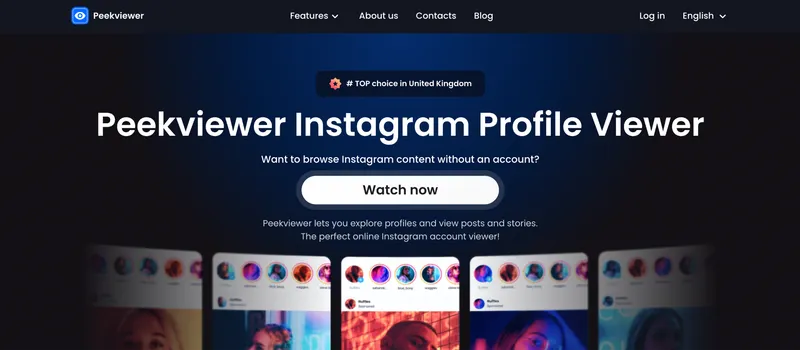
How to see deleted Instagram posts? This is where I'll be direct, because I use this tool every day and I know exactly what it does and doesn't do. Peekviewer isn't a recovery service. It can't reach into Meta's servers and pull back a deleted profile, nobody can. What it does is save what you track while you're tracking it, so deletion stops being the catastrophe it usually is.
When you follow an account through Peekviewer, the posts and stories you view get stored in your own userspace. What you tracked yesterday is still sitting in your account, untouched by their decision to vanish. As a deleted Instagram profile viewer, it works proactively, not reactively, and that single difference is the whole game. The same logic powers its Instagram story viewer — stories you watched stay saved long after they'd normally expire.
The catch is honest and worth stating: this only helps if you started tracking before the account disappeared. There's no retroactive magic. But for anyone watching an account they suspect won't last, it's the difference between losing everything and losing nothing. It's the same reason people who want to know how to view private Instagram profiles lean on tracking rather than scrambling after the fact.
What Gets Saved in Peekviewer Userspace
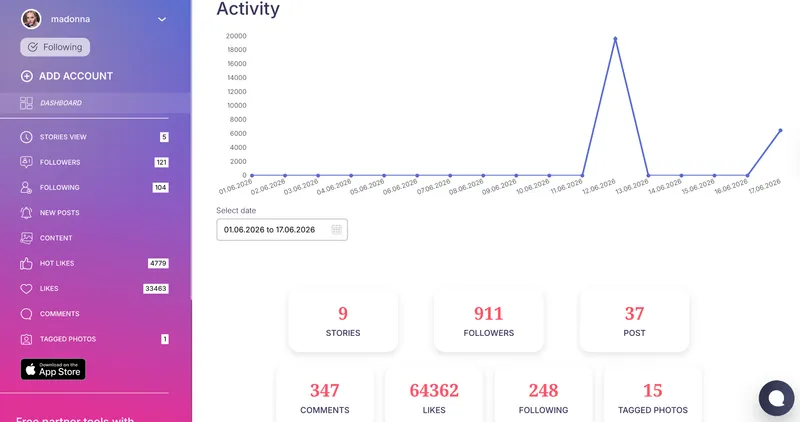
Once you're tracking an account with Peekviewer, everything you look at gets saved to your userspace and stays put. The posts, the stories, the likes, who they were interacting with, including the people the Instagram follower viewer picked up as their followers. All of it stays available for 3 months, and you can download whatever you need at any point, even if the account itself is already gone. So when they delete, none of it disappears on your end. You just open your userspace and it's all still there.
Using a Deleted Instagram Profile Viewer
A deleted Instagram account viewer can't reverse a deletion that already happened, that part is fixed, and any tool claiming otherwise is selling you nothing. What you can control is whether the next disappearance costs you everything. An Instagram deleted account viewer like Peekviewer only helps when it's already saved the content before the account goes dark, so the move is to start tracking the profiles you'd hate to lose while they're still here. Set up a deleted IG account viewer before you need one, not after.
FAQ
Not after it's been permanently removed, if no copy of the content was ever saved. Once Instagram completes deletion, the account and its posts are gone from Meta's servers and no third-party tool can retrieve them. The only content you can still access is what was captured elsewhere beforehand through a saved screenshot, a tagged post on an active account, or a tracking tool like Peekviewer that stored it during the account's active life.
No free tool reliably views a deleted account, though a few free methods occasionally surface fragments. The Wayback Machine sometimes archives public pages, but in testing it rarely has anything saved for a personal profile. Screenshots from mutual friends and tagged posts on still-active accounts can preserve scattered pieces, but they depend entirely on what other people happened to save.
Yes. When a user deletes their account, Instagram first holds it in a deactivated state for a short grace period in case they reconsider. After that window closes, the account and all its associated content are permanently removed from Meta's servers. There's no public recovery path for a deleted account that belongs to someone else, and support won't restore a stranger's data. Meta's official account-deletion help page is the clearest source on exactly how this process runs.
Peekviewer doesn't recover content after it's been deleted. But if you were tracking the account before it was deleted, all content captured during your active subscription is saved in your userspace for up to 3 months and available to download at any time.