



Your follower count dropped. Maybe by one, maybe by a dozen, and now you're staring at the number trying to work out who left. Or worse, there's a specific person in mind, someone whose absence you'd feel, and you just want confirmation. If you got recently unfollowed Instagram tells you nothing. This guide covers what actually works, what wastes your time, and the question hiding underneath all of it. Some of it runs through tools like an Instagram follower viewer; most you can do yourself in minutes.
Why Instagram Doesn't Tell You Who Recently Unfollowed
Instagram hides unfollow activity by design. It's not a bug or a feature they forgot, the platform chose never to notify you when someone leaves, because a constant trickle of "so-and-so unfollowed you" would make the whole app feel like a breakup notification service.
The only native signal is the number itself. Your count drops, and that's the entire story Instagram will tell you. Anyone working out how to know who unfollowed on Instagram smacks into this wall first: the platform knows precisely who unfollowed Instagram accounts and simply declines to say. Every method below is a workaround for a silence Instagram built on purpose, and the real point of how to see who unfollowed on Instagram is choosing the workaround that fits your situation, each has a limit worth knowing before you start.
Method 1: Check a Specific Profile Manually
If one person is already on your mind, this is the fastest route and where I'd begin. Open their profile and look right under the username for the "Follows you" tag. Still there? You're fine. Gone? They unfollowed you, clean confirmation, zero apps involved.
The limit is plain. This only helps when you have a name in mind, and it says nothing about the rest of your list. You can't sit there checking a thousand accounts one profile at a time. For a single nagging suspicion, though, nothing beats this thirty-second look.
Method 2: Monitor Your Follower Count Over Time
With no suspect, the next native option is watching the number move. Write down your count today, check again in a few days, and note the direction. A dip means someone recently unfollowed Instagram stopped following you in that stretch, and tracking it is one rough way to see who unfollowed Instagram activity is shrinking your audience.
The honest catch is large. This tells you that a change happened, never who triggered it. A count sliding from 1,204 to 1,201 proves three people left and names exactly none. It's an early warning, not an answer — the smoke alarm, not the camera. If your goal is to know how to see lost followers on Instagram by name, pair it with Method 1 the moment you have a hunch, and only then do you actually see who unfollowed Instagram with any precision.
Method 3: Cross-Check Your Following List
This flips the angle and works for accounts you follow but suspect have quietly dropped you. Open your own Following list, find the person, visit their profile, and check whether they still follow you back. It's Method 1 from the other direction, handy when you're scanning a few specific people rather than chasing a count.
My take: this is the method for the relationships that matter. You're not auditing strangers; you're checking the names you actually care about. For how to find who unfollowed on Instagram among mutuals, running down a short mental list beats any automated tool, because you already know who to look for.
Method 4: Use a Third-Party Unfollow Tracker App
Now the option everyone reaches for, and the one I'd talk you out of. These apps connect to your account, snapshot your follower list, compare it over time, and flag who fell off. On paper, exactly what you wanted, a real Instagram unfollow check on autopilot.
In practice, here's the trade. Most demand your Instagram login to function: you hand a stranger's app your username and password so it can read your follower data. The app-store listings for tools promising to check unfollowers Instagram keeps private bury that detail under five-star reviews. Instagram's own terms and security guidance warn directly against connecting apps that require your credentials, and the reason is concrete, once an app holds your password, you've lost control of what it does next. Many also break Instagram's rules outright, which means flagged accounts and tools that die overnight.
When I tested a couple, the pattern was bleak. One demanded full login before showing a thing; the other displayed a stale list and pushed an upgrade to "unlock" the names. Whether the listing pitches how to see unfollowers on Instagram or how to check unfollowers on Instagram in slightly different words, the deal is the same: you're trading your account's security for a feature Instagram withheld on purpose. To check unfollowers Instagram this way is a bad bargain almost every time. And if the reason you want to find who unfollowed me on Instagram is really to keep an eye on one specific person, there's a different route worth knowing.
Want to Monitor Someone's Instagram Activity? Try Peekviewer
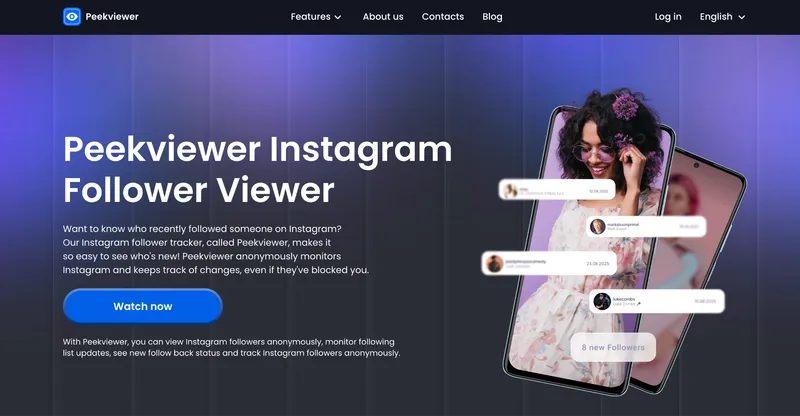
Let me reframe what's usually happening here, because the unfollow question tends to be a stand-in for a sharper one. You noticed someone left. What you actually want is to know what they're doing now, what they post, who they talk to, whether they're even still active. That's not an unfollow-tracker job. It's a monitoring job, and it's where I'd send you.
Peekviewer isn't an unfollow tracker, and I won't pretend it tallies departures from your list. What it does serves the real intent behind how to see who unfollowed on Instagram far better: it lets you monitor any Instagram profile, account-free, with no Instagram login and no trace left on their end. No password surrendered, no app holding your credentials, none of the Method 4 exposure. As an Instagram private account viewer, it works the same way a logged-in follower would see the profile, except you never sign in at all. You type a username and see what that person is genuinely up to.
What Peekviewer Shows You
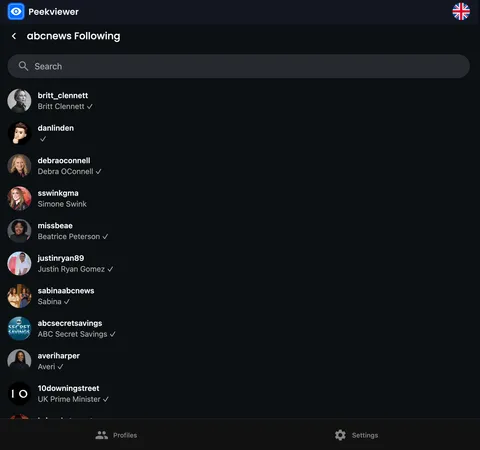
The useful features here are the ones tied to ongoing activity. Anonymous story viewing and a post viewer show what someone's sharing. The anonymous Instagram story viewer is the part people use most, since stories vanish in 24 hours and this keeps them in reach. The follower and following viewer reveals how their connections are shifting. Activity tracking surfaces who interact with them most, usually a more telling signal than a raw follow count ever was.
Then the data history angle, which catches people off guard. Peekviewer stores up to 3 months of profile data, so you can see what someone posted and who engaged with them even before you started tracking. For anyone working through how to see recently unfollowed on Instagram behavior, that's the difference-maker: once you know who left, this fills in the full picture instead of leaving you with a name and a shrug. If reading those patterns is the point, our guide on how to see activity on Instagram goes deeper. If you're still thinking “Is Peekviewer legit?”, that breakdown is worth a read first.
How to Use Peekviewer
It's short. Enter the username of the profile you want to monitor and activate a subscription. When all things are done, open their stories, posts, follower data, and activity from the dashboard. You don’t need to share Instagram login, account of your own, or any other red flag signs. That account-free setup is the whole reason people use it to view Instagram without account in the first place. That's the whole process.
Can You See Who You Recently Unfollowed on Instagram
The reverse question lands just as often: how do you see who you unfollowed? The answer disappoints in the same way, and I'll give it straight.
Instagram doesn't show this either. Your Following list reflects who you currently follow — no history of accounts you dropped, no timeline of your own exits. There's no native Instagram unfollow check for your past moves and no setting that surfaces them. Unfollowing someone six months ago and forgetting who? Instagram won't remind you. It treats your unfollow history exactly like everyone else's: invisible, unlogged, gone.
The Honest Bottom Line
Getting recently unfollowed Instagram keeps quiet about by design, and the only precise native method is checking specific profiles one at a time. Skip the credential-hungry tracker apps, the security trade isn't worth a feature Instagram withheld on purpose. If what you really want is to understand what someone's doing after they left, monitor their activity directly instead of counting heads.
FAQ
No. Instagram never sends a notification when someone unfollows you, and that's a deliberate design choice rather than a missing feature. The only native signal is a change in your follower count, which tells you the number moved but not who caused it. To identify a specific person, you have to check their profile manually for the "Follows you" label, since no built-in log of unfollow activity exists. This is exactly why how to see who unfollowed on Instagram is such a common search — the platform makes the answer very hard to find.
The most reliable native method is checking a specific profile: visit the person you suspect and see whether "Follows you" still appears under their username. For a broader view, track your follower count over time to spot when drops happen, though that won't name the people who left. Third-party apps promising to find who unfollowed me on Instagram mostly require your login credentials and carry real security risk, so they're rarely worth it. If you want a safer way to figure out how to see who unfollowed on Instagram, start with the manual profile check rather than any app demanding your password. There's no single button for how to find who unfollowed me on Instagram, but combining the count drop with a manual check gets you closest.
No, Instagram doesn't provide this either. Your Following list shows only the accounts you currently follow, with no history of anyone you've unfollowed and no timeline of your past actions. There's no native setting or feature that reveals your own unfollow history, and no reliable way to reconstruct it afterward. The same limitation that makes a question about how to find who unfollowed me on Instagram so frustrating applies in reverse: Instagram simply doesn't log unfollow events for anyone to see.
Generally no, and the main reason is that most require your Instagram login credentials to work. Handing your password to a third-party app exposes you to account takeover and data misuse, and Instagram's own terms warn against connecting apps that demand credentials. Many of these tools also violate Instagram's rules, which can get your account flagged or leave the app dead without warning. If you want follower or activity insight, a tool that works without your login like Peekviewer is a far safer choice than one asking for your password. Treating these apps as the default answer to how to see who unfollowed on Instagram is what gets people's accounts compromised in the first place.
Peekviewer lets you monitor any Instagram profile without logging into Instagram and without leaving a trace on the other person's account. You enter the username and can view their stories, posts, follower and following data, and activity from a single dashboard, with no account of your own required. It also stores up to 3 months of profile data, so you can see what someone was posting and who engaged with them even before you started tracking. It isn't an unfollow tracker, but for understanding what a specific person is doing, it's more useful than any follower-counting app. Once you've worked out how to find who unfollowed me on Instagram through the manual checks above, this is how you see what they're actually up to next.