



You found a creator, a brand, or a stranger who slid into your DMs, and before you commit to anything you want to know who they actually are. That is what an Insta bio viewer is for. It reads the part of an Instagram profile that tells you the most: the bio, the link, the contact info, without opening the Instagram app or logging in. A good private Instagram account viewer does the same for accounts that keep their doors shut.
What Is an Insta Bio Viewer?
An Insta bio viewer is a tool that surfaces someone's Instagram bio — their display name, description, link in bio, contact details, and profile photo — without an account of your own and without logging in. It is worth treating this as its own useful thing. A bio is the most honest square inch of any profile. It is where people declare what they sell, where they link, and who they claim to be, which makes it the fastest way to size someone up.
Why Would You Need an Instagram Profile Bio Viewer?
Plenty of ordinary reasons, and none of them shady. You are about to follow an influencer and want to see whether the link in bio goes to a real shop or a dead Linktree. You are about to buy from a small business and want to confirm it is a business at all, not a three-post account that vanishes after payment. You want to verify that the person messaging you is who they say they are before you reply.
There are quieter uses too. Marketers watch a competitor's positioning and note the day their link in bio changes to a new campaign. A recruiter checks a candidate's public profile before a call. In every case the appeal of a bio viewer is the same: you get the information without the visit registering, which is how to view someone's Instagram without an account. My honest take is that the competitive-research use is the most underrated one, the link in bio is the single most telling field a rival will change, and watching it costs you nothing.

What Information Does a Bio Viewer Show?
A capable bio viewer surfaces the whole public identity layer of a profile in one look:
- Display name and username
- Profile photo, full size
- Bio text and description
- Link in bio — website, Linktree, shop, or campaign URL
- Follower and following count
- Whether the account is public or private
- Verified status
That is enough to judge legitimacy in seconds. If the follower count is high but the bio is empty and the link is dead, you have learned what you needed to.
The Key Advantage: Viewing Bios Anonymously
Here is the real difference between a bio viewer and just tapping over to someone's profile in the app. When you visit a profile while logged in, you leave faint traces. Some account types can see who has been viewing them, and you are always one mis-tap away from an accidental like that announces you instantly. A dedicated bio viewer removes that risk entirely. You check what you need to check and the other person's screen stays quiet.
What About Private Instagram Accounts?
This is where most tools quit. On a private account, Instagram shows the bio, username, display name, and follower counts, and locks everything else behind a follow request. Posts, stories, tagged photos: all sealed unless the owner lets you in.
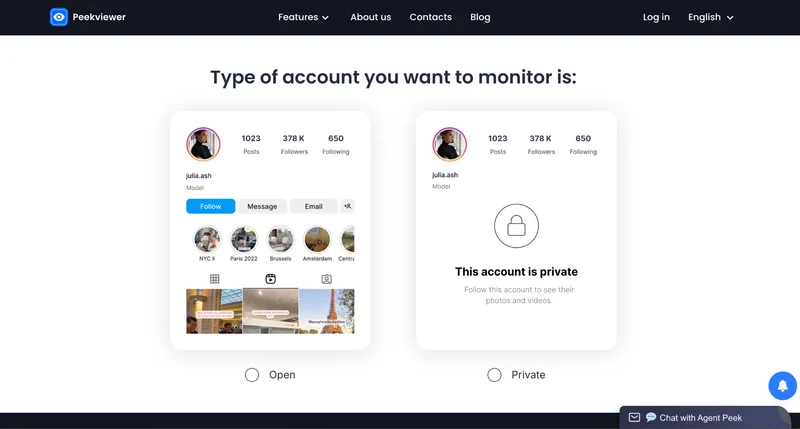
Peekviewer goes past that wall. With only a username, it pulls a private account's posts, stories, follower and following activity, tagged photos, and likes. When I ran a private fitness coach's handle through it, the bio and dead promo link loaded first, as expected. Then the tagged photos the app had hidden behind the follow wall loaded too, and the follower count matched the number the app showed to the letter. If your goal is to know how to see someone's photos on Instagram rather than just their bio blurb, that difference is the whole point.
Insta Bio Viewer as Part of a Bigger Tool: Peekviewer
Peekviewer folds bio viewing into a complete Instagram profile viewer. You can read anyone's bio, profile photo, and public details, then keep going: posts, stories, follower and following changes, likes, and tagged photos, all from one dashboard with no Instagram account required.
What Peekviewer Shows Beyond the Bio
Once you are past the bio, the dashboard covers the rest of the profile:
- Full profile bio and link in bio
- Instagram post viewer
- Profile photo and stories
- Instagram following viewer
- Hot Likes — new likes landing on old posts
- Tagged photos
- 3-month activity history
- Public and private accounts alike
How to Use Peekviewer as an Instagram Profile Bio Viewer
The flow takes under a minute:
- Go to peekviewer.com.
- Enter the Instagram username and activate subscription.
- When all is set, view the full profile, bio included, right away.
There is no login, and it runs on any device with a browser, which is really all you need from a blocked Instagram account viewer.
Conclusion
An Insta bio viewer fills a small but real gap: sometimes you just need to check a profile quickly, quietly, and without leaving a mark on the other person's account. Peekviewer covers that first look and everything behind it, on public and private profiles alike. For anyone who vets people before trusting them — buyers, marketers, recruiters, or the merely careful — that combination is hard to beat.